Pages

Gambit Communications® Network Simulation

Gambit Communications® is a provider of tools for simulating servers, networking and storage devices.

Network management software

MIMIC Simulator for testing your network management software.

Network Management Apps

MIMIC Simulator for testing your network management software. SNMP Simulation.

MIMIC Web Simulator

Create a large virtual lab with Gambit Communications.

IOS Simulator

IOS based apps Using MIMIC Simulator.

Tuesday, 21 October 2014

SNMP – Overview and Basic Concepts

Simple Network Management Protocol or SNMP is an Internet Standard Protocol for managing tools on IP networks. Devices that generally support SNMP comprise of switches, routers, servers, printers, workstations and modem racks. SNMP is mostly used in network management systems to scrutinize network-connected devices for states that call for administrative consideration. SNMP is a part of the IPS (Internet Protocol Suite) as classified by the IETF (Internet Engineering Task Force). Simple Network Management Protocol provides managing data in the form of variables on the controlled systems, which explain the system configuration.

SNMP standards:

Introduced in the 80s, the original edition of SNMP, SNMPv1, lack some crucial functionality & only worked with IP or TCP networks. An enhanced version for SNMP, SNMPv2 was introduced in 1992. Even though Simple Network Management Protocol had many security issues, several networks remained on the SNMPv1whilst others implemented SNMPv2. Recently, the SNMPv3 version was introduced to address those issues with SNMPv1 & SNMPv2 and allowed managers to move to one regular SNMP standard.

Overview & basic concepts of SNMP:
mimic2
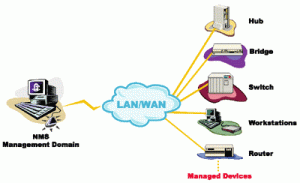
In general SNMP uses, one or more administrative computer systems, known as managers, have the responsibility of monitoring or controlling a group of devices or hosts on a computer network. All managed systems execute a software module called an agent which provides information using SNMP to the manager. SNMP agents assign management data on the controlled systems as variables. Also, the protocol allows active management responsibilities, such as revising & employing a new configuration via remote adjustment of these variables. The variables available via SNMP are prearranged in ranking. These ranking, and other meta data are included in MIBs (Management Information Bases).

An SNMP-controlled network comprises of three crucial elements:

• Managed device
• Agent software that runs on controlled devices
• NMS or Network management station application that runs on the manager

MIMIC SNMP simulator:
 

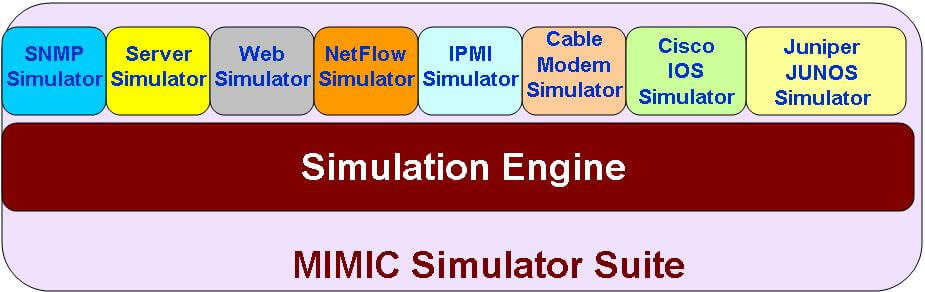
MIMIC SNMP Simulator creates a network of up to 100,000 SNMP-manageable devices. You can create any SNMP-based device with any number of public or private MIBs to run a large variety of device configurations with your SNMP management application. It lets you generate thousands of traps to simulate disaster scenarios.

Follow Gambit Communications on:-
 
facebook twitter linkedin

Sunday, 19 October 2014

Network Monitoring – An Overview

Network monitoring is needed in a system that persistently scrutinizes a computer network for sluggish or weakening components. It informs the network administrator via SMS or email in case of outages. It’s a part of network management.

wca_2006_winner
Whilst an intrusion-detection system scrutinizes a network for dangers from the exterior, a network monitoring system scrutinizes the network for issues sourced by overloaded or crashed servers. For instance, to know the status of a web server, monitoring software might sporadically send an HTTP request to obtain a page. For e-mail servers, a text message might be sent via SMTP & recovered by POP3 or IMAP.

Generally measured standards are response time, accessibility & uptime, though both reliability and consistency measures are beginning to obtain popularity. The extensive incorporation of WAN optimization tools is having negative effects on most of the network monitoring devices – particularly when it is about observing precise end-to-end response time since they restrict round trip visibility.

Internet server monitoring


Monitoring an internet server denotes that the owner of the server always notified if one or more of services go down. Server monitor could be internal, for example, web server application verifies its status and informs the proprietor if some services go down, and external, i.e. some web server monitoring firms verify the service status with certain regularity. Server monitoring can cover a test of system measures, such as memory usage, CPU usage, disk space and network performance. Also, it can comprise application monitoring, such as verifying the procedures of programs such as Nginx, Postgres, Apache, MySQL and others.

External monitoring is more dependable, as it keeps working when the server totally goes down. Also, manyserver monitoring tools have performance benchmarking, alerting abilities & the capability to connect certain entrances with automatic server responsibilities such as performing a backup.

Follow Gambit Communications on:-
 
facebook twitter linkedin

Friday, 26 September 2014

Network Simulator Software – Managing Network Operation is Now Hassle Free

Testing remote connectivity options are generally more demanding compared to test the local area network. Remote connectivity generally involves the utilization of transmission devices that aren’t managed or own by the client. These tools are normally not accessible to the network administrator for examining purposes. As a result, the network administrator must find means to analyze the projected network plan without having access to the real transmission devices.

The designers can make use of the following techniques to check the remote connectivity designs:

• Simulation Software

• Prototype testing making use of simulated links

• Pilot testing in the real environment


Simulated settings can provide a means to analyze device configuration & operation. Following the design is examined in the simulated setting; remote connectivity could be additionally examined in a test installation.

SNMP Simulator (Network simulation software):

SNMP Simulator provides the designers several tools for checking configuration ahead of executing them on real devices.
Simulation

The advantages of using this approach are:

• Lower expenditure – prototype networks are costly to develop & maintain. Networking mechanism configuration options change quite often. Thus, maintaining a test setting up-to-date could be demanding.

• Adaptability - SNMP Simulation software can support many different types of devices& connectivity options. Altering configuration & topologies is usually much easier and quicker in a simulation setting.

• Scalability – Installing a large or complicated network in a lab setting is unproductive.

• Control – SNMP simulation software permits the network administrator to handle the entire network operation better. The network architect can also control the kinds of traffic to send over the network & the speed at which traffics are sent. Also, the architect can prevent the simulation to detain and scrutinize TCP or IP packets at many points in the network.


MIMIC SNMP Simulator:

MIMIC SNMP Agent Simulator creates a network of up to 100,000 SNMP-manageable devices. You can create any SNMP-based device with any number of public or private MIBs to run a large variety of device configurations with your SNMP management application. MIMIC MIB Wizard can compile any number of MIBs, in any order at the same time. MIMIC ships with a large number of pre-compiled MIBs, networks and devices from the leading networking companies.

Follow Gambit Communications on:-
facebook twitter linkedin

Wednesday, 24 September 2014

NetFlow – What It Is All About

NetFlow is a network protocol created by Cisco for the collection & screening of network traffic flow through switches and routers. NetFlow is widely used by IT pros to scrutinize network traffic flow & volume to make sure from where traffic is coming, where it’s going to, and also how much traffic is being produced. NetFlow-enabled routers forward traffic statistics as NetFlow documents which are then gathered by a NetFlow collector. The collector performs the real traffic analysis & presents it to the users. Collector can be a software or hardware appliance. gambit_pic_1NetFlow has turned out to be a de-facto industry standard and is backed up by platforms other than CISCO comprising, Juniper, HP, Dell and Netgear, Huawei, Ericsson and Alcatel-Lucent.

While screening the performance of networks and applications, the more insight you’ve into the real traffic, the better. If you collect all the traffic the data volume will be very high. NetFlow offers this insight and also reduces the volume significantly. Without the requirement of sniffers or probes, you can swiftly and constantly keep an eye on the composition of the traffic navigating your most complicated links. MIMIC NetFlow simulator creates an easy way to generate NetFlow traffic from thousands of devices in the shape and pattern you want. It enables you to promptly pick up bandwidth hogs, DDos attacks & inefficient traffic, and offers you a familiarity of how applications are making use of your network. No doubt, these insights are significant in deciding how to prioritize traffic and on the formation of policies to eradicate inefficient traffic.


MIMIC NetFlow Simulator generates a variety of flows and enables you to fully test your applications. Since you have a complete control over generated flowsets you can easily verify that your graphing application is correctly displaying the values, and your collector correctly collects precisely generated flowsets. The MIMIC NetFlow Simulator is the industry's first integrated simulation tool supporting NetFlow and SNMP. It allows developers to perform real world, integrated device simulations. Network management now will be much easier than ever before.


Follow Gambit Communications on:-
facebook twitter linkedin

Tuesday, 23 September 2014

A Complete Overview of SNMP

For network systems, supervising the current status of the network, devices and the traffic is a must. And for this reason, one should understand how SNMP works, and how it makes the job of monitoring data simple.

Basis function of SNMP:

SNMP (Simple Network Management Protocol) was developed as part of many Internet protocols. Nowadays, it’s used widely to control devices connected to various kinds of network systems.

How Simple Network Management Protocol work?

Let’s have a look at an example of how SNMP works. Imagine that there’s an NMS (network management system), and it has many "mini networks" affixed to it. There’s a steady flow of data moving forward and backward, which should be controlled by the major network system. To make this procedure simple, an SNMP agent is installed in all of these network components.
Each SNMP component has diverse responsibilities, but what they basically perform is offer feedback info on each network component to the mainstream network. The info that’s processed comprises relaying facts regarding accessible system resources, programs running, memory, traffic etc. All the mainstream operating systems, from UNIX to Windows, could be configured to have SNMP components installed.

SNMP editions:


Usual elements of an SNMP:

Relying on the network, a Simple Network Management Protocol could have many elements, but even the simplest have the following:

• Network elements – this is the SNMP component. The info contained here is what‘s transmitted back to the NMS (network management system). Parts that can comprise a component range from printers to routers to hubs.
• Agent – this is the program that’s in the network component that makes the transmission of data to the NMS. Its main function is to check the diverse aspects & changeable in each network component.

Instances of SNMP messages:

There’re many kinds of SNMP messages that could be released or developed by the major network. Some of the messages are:

• SNMP TRAPs – The SNMP TRAPS a distinctive message sent to the major network system via one of the components it’s controlling in case it falls short to function appropriately or hardware malfunction takes place.


• SNMP GET - This message is utilized by the major network to obtain data from 1 of the other network components. To modify some statistics, SNMP SET is used whereas SNMP MIB is utilized to adjust the changeable in both software and hardware.


Follow Gambit Communications on:-
facebook twitter linkedin

Wednesday, 3 September 2014

SNMP Trap Fundamentals!

SNMP trap is one of the five type of fundamental message utilized in SNMP protocol. What produces an SNMP trap distinctive from other kind of message is the truth that it’s the only procedure that could be initiated directly through an SNMP agent within the field. They asynchronously generated messages. Other type of core SNMP messages are either instigated through the SNMP managed or subjected in reply to SNMP manager’s message. This is what creates a trap very crucial as well as the most typical SNMP message within most of the networks.


http://www.gambitcomm.com/site/images/MIMIC_diagram6.JPG

SNMP traps are most usually issued by one of the two different device types. Some devices, particularly those constructed in recent times, are capable to send SNMP without any help to aware an SNMP manager while it experience an issue. Not like other protocols, SNMP traps offer no affirmation that the message is collected by the SNMP manager. Latest editions of SNMP comprise a new kind of message known as “inform" message. A SNMP inform message is validated by the SNMP manager. However, if SNMP agent doesn’t see authentication from SNMP manager that it’s inform message has been collected, it resends the inform message.

There’re two major means to transmit helpful info utilizing SNMP traps. One is called as "granular traps". Well, Granular trap might be differentiated from each other since they each have an exclusive recognition number. The SNMP manager collecting the SNMP traps from the equipment will find the Object Identifier (OID) within a translation folder called a MIB (Management Information Base). Since granular traps utilize distinctive identification number to sustain this lookup procedure, no true alarm data essentially requires to be contained inside the SNMP trap. And this decreases bandwidth used by SNMP traps, since they aren’t sending superfluous info via the network that the Simple Network Management Protocol (SNMP) manager could effortlessly find on its own.

You can use MIMIC SNMP Simulator to generate any type of trap or trap storms. You can generate thousands of traps from one or more devices. Each of them can be of a different type or with different varbinds. You can also use the trap recorder to record the traps generated by any device and then play it back. MIMIC Simulator makes it much easier to test your network management application or a trap receiver.

Follow Gambit Communications on:-
facebook twitter linkedin

Wednesday, 27 August 2014

SNMP – The Most Renowned Protocol for Network Management

Simple Network Management protocol or SNMP, is a renowned protocol for network management. It’s utilized for gathering info and configuring network devices like hubs, printers, routers and switches on an IP (internet protocol) network. Microsoft windows 2003 server offers SNMP agent software which works with 3rd party SNMP management application to observe the status of managed applications and devices.

SNMP background:
 

Developed in the year of 1988 to supply network-device-monitoring competence for TCP or IP-based networks, Simple Network Management protocol (SNMP) was accepted as an Internet standard in the year of 1990 by the IAB (Internet Architecture Board) and has been used widely since that time. More lately, IPX (Internetwork Packet Exchange) based networks have supplementary support for Simple Network Management Protocol. At present, most of the network device retailers’ supply SNMP support in their stuffs.

mimic3 Automating network managements:
 
Bigger networks with larger amount of nodes are complicated to handle without good number of staffs to scrutinize each computer system. SNMP, which is used widely in LANS (local area networks), allows you to scrutinize network nodes from an administration host. Users can scrutinize network devices like servers, printers, workstations, hubs and bridges, and also services like DHCP (Dynamic Host Configuration Protocol) or WINS (Windows Internet Name Service).

SNMP Agent:
 
Well, the agent is a type of program that’s packaged inside the network component. Allowing the agent enables it to accumulate the management information record from the devices close by and makes it accessible to the SNMP manager, when it’s asked for. However, these agents can be specific or standard to a retailer. Some of the key functions of SNMP agent’s are:

• Accumulate management information regarding its local surroundings.

• Stores & retrieves management info as classified in the MIB

• Acts like a substitute for some non SNMP viable network node.

• Signals a happening to the SNMP manager

Fundamental commands of SNMP:
 
The straightforwardness in information exchange has made SNMP as widely approved protocol. Few of the basic commands of SNMP are the following:

• GET – The GET command is a request propelled by the SNMP manager to the controlled device. It’s performed to recover 1 or more values from the controlled equipment.

• GET BULK – The GET BULK command is utilized to recover large data from big MIB table.

• SET: This command is utilized by the SNMP manager to assign or modify the worth of the managed equipment.

MIMIC SNMP Simulator:
 
MIMIC SNMP Simulator creates a network of up to 100,000 SNMP-manageable devices. You can create any SNMP-based device with any number of public or private MIBs to run a large variety of device configurations with your SNMP management application. It lets you generate thousands of traps to simulate disaster scenarios. 

Follow Gambit Communications on:-
facebook twitter linkedin